Telecom Trends to Watch in 2026: Insights for Columbus Business Leaders

Columbus telecom companies like Data Talk are here to prep your business for many changes in the new year!

telecom companies in columbus, ohio like Data Talk support businesses of all sizes with comprehensive telecom solutions.

As Columbus, Ohio continues to grow as a hub for commerce, technology and innovation, local business leaders are increasingly looking to telecom companies for solutions that enhance connectivity, efficiency and security.

The telecom landscape is evolving rapidly, and 2026 promises to be a pivotal year for businesses seeking to stay competitive. From the expansion of 5G networks to Cloud-based communication platforms and AI-driven tools, understanding upcoming trends is critical for companies of all sizes.

All of us at Data Talk are very proud to be one of the top-rated telecom companies in Columbus, Ohio, which is why we’re offering our 2026 trends to watch for list to help you get ready for year-end preparations!

5G Expansion & Business Connectivity

One of the most significant trends for 2026 is the continued expansion of 5G networks across Columbus.

Telecom companies in the area are rolling out faster, low-latency networks that enable businesses to leverage technologies that were previously difficult or impossible to implement.

For Columbus business leaders, 5G translates to:

  • Enhanced mobile connectivity: Employees can access enterprise systems, Cloud applications, and communication tools seamlessly from anywhere in the city.
  • Improved IoT integration: Smart devices and sensors in warehouses, retail environments and offices can transmit data more reliably, enabling real-time monitoring and automation.
  • Support for augmented and virtual reality (AR/VR): High-speed networks allow immersive applications for training, remote collaboration and customer engagement.

The key for Columbus businesses is to work closely with local telecom providers to assess 5G readiness and identify areas where infrastructure upgrades or device compatibility improvements may be required.

Cloud-Based Telecom Solutions

Another major shift is the ongoing adoption of Cloud-based telecom systems. Unlike traditional phone lines and on-premises PBX systems, Cloud platforms offer scalability, flexibility and cost-efficiency.

In 2026, Columbus businesses are expected to increasingly rely on Cloud telephony, unified communications, and collaboration tools to streamline operations. Some of the top benefits include:

  • Remote accessibility: Employees can make and receive calls, attend virtual meetings and access messaging platforms from any device.
  • Scalability: Businesses can easily add or remove lines, features, or users without major infrastructure changes.
  • Advanced analytics: Cloud solutions provide detailed call tracking, usage patterns and performance metrics to inform strategic decisions.

Partnering with a local telecom provider that specializes in Cloud systems like Data Talk goes a long way to ensure smooth integration with existing IT infrastructure—while minimizing downtime and disruption!

AI & Automation In Telecom

Artificial intelligence is becoming a transformative force in telecommunications. For Columbus businesses, AI-powered solutions are not just a novelty—because they’re also essential tools for enhancing customer service, improving operational efficiency and making data-driven decisions.

Some common examples include the following:

  • Automated call routing: AI systems can direct callers to the right department or representative based on context and history.
  • Predictive maintenance: Telecom companies use AI to detect network anomalies before they cause outages, ensuring uninterrupted service for businesses.
  • Enhanced customer insights: Machine learning algorithms analyze communication patterns to optimize marketing campaigns, sales outreach and support strategies.

Investing in telecom solutions that leverage AI allows Columbus business leaders to stay ahead of competitors, while simultaneously improving overall service quality.

Cybersecurity & Compliance

As telecom systems become more integrated with business operations, the need for robust cybersecurity inevitably grows.

In 2026, Columbus businesses will need to prioritize secure communication channels, encrypted data transmission, and compliance with federal and state regulations. This is why local telecom providers like us are increasingly offering:

  • Secure VoIP solutions that protect sensitive calls and data.
  • Network monitoring services to detect and respond to threats in real-time.
  • Compliance support for industries like healthcare, finance and government that require strict communication security standards.

Collaborating with the Data Talk experts ensures that your company’s security is embedded into communication systems from the ground up!

Preparing Your Telecom Strategies For The Future

To capitalize on the above trends, Columbus business leaders should take proactive steps:

  1. Audit current telecom infrastructure to identify areas for upgrade or replacement.
  2. Engage with the Data Talk team to explore 5G deployment, Cloud integration and AI-enhanced solutions.
  3. Develop a security strategy that addresses emerging risks, while maintaining compliance.
  4. Plan for scalability to accommodate growth, seasonal staffing changes or expansion to new locations.

By acting now, businesses can avoid costly last-minute upgrades and position themselves to leverage the full potential of modern telecom technologies throughout the course of 2026!

Contact Data Talk When Looking For Top-Rated Telecom Companies In Columbus, Ohio!

2026 is shaping up to be a transformative year for telecommunications in Columbus, Ohio. From 5G networks to Cloud-based platforms, AI integration and enhanced security measures, the opportunities for improved connectivity and operational efficiency are immense.

Columbus business leaders who understand these trends and partner with forward-thinking telecom companies like Data Talk will not only stay competitive, but they’ll also create a foundation for long-term growth and innovation.

Investing in the right telecom strategy today is more than just a technical decision—because it’s also a strategic move that can drive productivity, customer satisfaction and business success well into the future.

Reach out to us online or give us a call at 614-784-7100 to get in touch with our telecom experts today and let us know about your team’s 2026 strategies!

Cheat Sheet: Cloud Business Phone System Comparison

Why Cloud Based Business Phone Systems Are Changing How Businesses Communicate


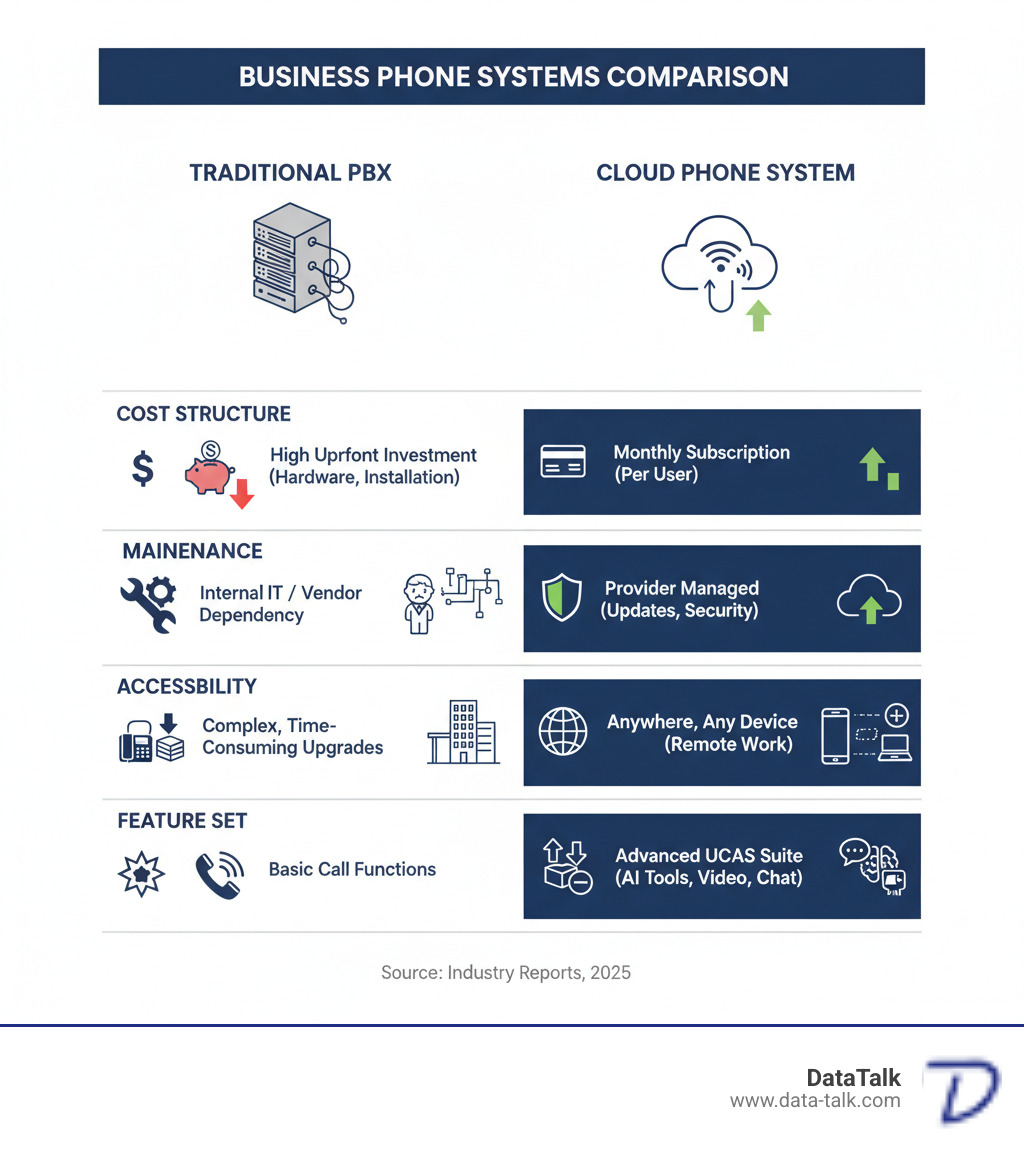
A cloud based business phone system is a phone service that operates over the internet instead of traditional phone lines, allowing businesses to make and receive calls from any internet-connected device—desk phones, computers, or smartphones. Unlike older on-premises PBX systems that require expensive hardware and maintenance, cloud phone systems are hosted by a provider, who handles all updates, security, and infrastructure.

Key facts about cloud based business phone systems:

  • Cost Model: Monthly subscription (typically $15-$50 per user) vs. large upfront investment for traditional systems
  • How It Works: Uses VoIP (Voice over Internet Protocol) to convert voice into digital data packets transmitted over the internet
  • Setup Time: Can be operational in minutes to days, not weeks or months
  • Access: Make calls from desk phones, computers, or mobile devices from anywhere
  • Features: Includes auto-attendants, call routing, voicemail-to-email, team chat, video meetings, and AI-powered tools
  • Scalability: Add or remove users instantly as your business grows or changes

The shift to cloud communications is accelerating rapidly. The global cloud communication market is projected to grow from $102.54 billion in 2022 to $248.30 billion by 2029. By 2026, 75% of small and mid-sized businesses will have migrated from on-premises phone systems to cloud-based solutions.

This isn’t just about replacing old equipment. Traditional copper wire phone lines are being phased out—the FCC is actively deregulating them, and Europe is already switching to all-digital systems. Businesses sticking with legacy PBX systems face rising costs, scarce technicians who can maintain them, and difficulty finding replacement parts.

Cloud phone systems solve these problems while offering something traditional systems never could: true flexibility. Your team can work from the office, home, or anywhere else without missing calls or losing functionality. Companies using cloud-based phone systems report an average 30% cost savings compared to traditional systems, while also seeing a 25% increase in employee productivity.

For small business owners in Ohio, this transition represents both an opportunity and a challenge. The opportunity is clear—better features, lower costs, and support for modern work styles. The challenge? Ensuring your internet connection can handle business-grade voice traffic reliably, which is where network readiness becomes critical.

infographic showing comparison between traditional PBX and cloud phone systems, including cost structure, maintenance responsibility, accessibility, scalability, and feature sets - cloud based business phone system infographic

Cloud Phone Systems: Key Advantages for Modern Businesses

Making the switch to a cloud based business phone system gives your business real advantages that translate to your bottom line. For businesses across Ohio, from Columbus to Akron to Cincinnati, cloud phone systems deliver benefits that traditional on-premises setups simply can’t match.

streamlined office with cloud-connected devices - cloud based business phone system

With a cloud system, the entire infrastructure lives in your provider’s secure data centers, not your office. There’s no bulky equipment to maintain or tangled wiring to manage. Your provider handles all updates, security, and maintenance. This is a stark contrast to traditional on-premises PBX systems, where you own all the hardware and shoulder the responsibility for keeping it running. If you’re curious about the technical details, we’ve broken down the differences between hosted IP PBX and premise-based systems.

Key Benefits of a Cloud Based Business Phone System

The shift to cloud communications creates tangible improvements across your entire operation.

  • Cost Savings: Companies report an average 30% reduction in costs compared to traditional setups. By shifting your phone system from a large capital expense (CapEx) to a predictable operational expense (OpEx), you improve cash flow and simplify budgeting. We’ve outlined 5 specific ways cloud systems reduce costs for Ohio small businesses.

  • Scalability and Flexibility: Need to add fifteen employees for a new contract or scale down during a slow season? With a cloud system, you can add or remove users instantly through an online portal. Your phone system expands and contracts exactly when you need it to.

  • Remote Work Support: A cloud based business phone system is built for modern work. Team members can make and receive business calls from their laptops, smartphones, or desk phones, whether they’re at home in Columbus or at the office in Akron. Companies embracing this flexibility see a 25% boost in employee productivity.

  • Business Continuity: If your office loses power, a cloud system automatically reroutes calls to mobile phones or other locations, so your business keeps running. Many providers maintain impressive uptime records, with some achieving 99.999% availability—that’s roughly five minutes of downtime per year.

  • Reduced IT Burden: With a cloud provider handling the technical heavy lifting, your IT team is free to focus on strategic initiatives. Businesses report a 50% reduction in IT support costs related to telephony after making the switch.

Considerations When Moving to the Cloud

While the advantages are significant, it’s important to consider these factors before making the switch.

  • Internet Dependency: Your phone system runs over your internet connection, so a reliable, high-speed connection is essential. At DataTalk, we take this seriously, which is why we perform our VOIP Scout Test before deployment to guarantee your network is ready.

  • Bandwidth and Latency: For crystal-clear voice calls, you need sufficient bandwidth and low latency. Quality of Service (QoS) settings help prioritize voice traffic over less time-sensitive data. We’ve put together a guide covering everything Columbus entrepreneurs should know about VoIP QoS.

  • Security: Cloud providers invest heavily in infrastructure security, but you must secure your end of the connection by using strong passwords and managing user access.

  • Budgeting and Integration: While cloud systems deliver long-term savings, you may have initial costs for new IP phones or network upgrades. It’s also important to verify that the new system can integrate with your existing critical workflows.

Essential Features and Advanced Capabilities of a Cloud Based Business Phone System

Today’s cloud based business phone system is a communication powerhouse that unifies everything your team needs to work smarter. This concept, known as Unified Communications as a Service (UCaaS), brings phone calls, video meetings, and team chat into a single application, boosting efficiency and collaboration.

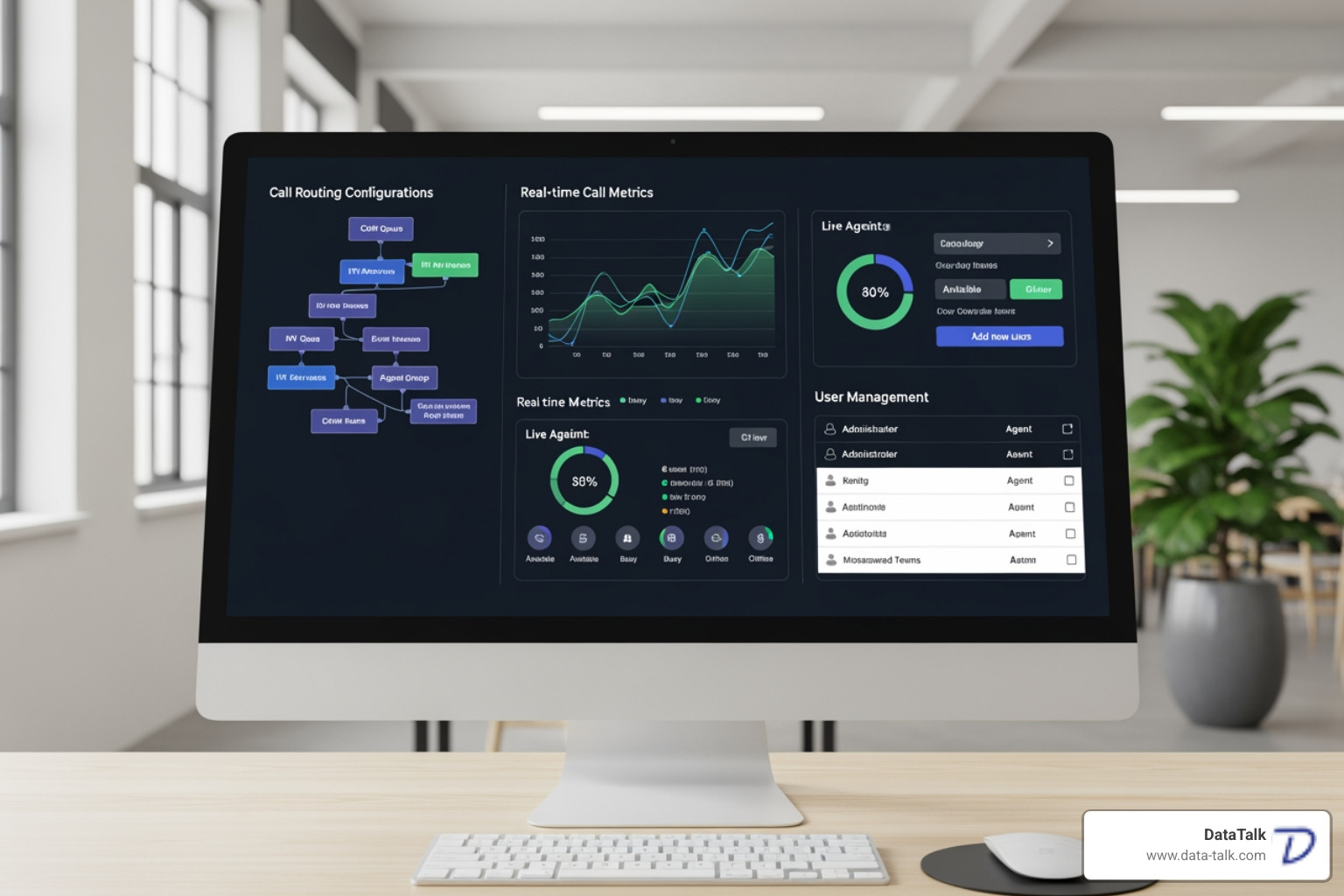
software dashboard with call routing - cloud based business phone system

By 2027, 85% of enterprises are expected to adopt UCaaS platforms. Companies that make the switch typically see significant productivity gains, and we’ve seen this with our Columbus clients. If you’re curious about the real-world impact, check out How Unified Communications Can Make Your Company More Productive.

Core Features Every Business Needs

When we help Ohio businesses choose a system, we ensure these fundamental features are rock-solid to make daily operations run smoothly.

  • Call Management: The basics that must work flawlessly, including call forwarding, call transfer (warm and blind), call waiting, and caller ID.
  • Auto-Attendant: Your digital receptionist that greets callers with a custom message and routes them to the right person or department.
  • Call Queues: Keeps callers on the line with music or messages until an agent is available, reducing missed calls and customer frustration.
  • Visual Voicemail: Delivers voicemail transcriptions to your email or mobile app, allowing you to scan messages and prioritize callbacks.
  • Mobility Features: Desktop and mobile apps that give your team full phone system functionality from anywhere, which is essential for remote and hybrid teams.
  • Analytics and Reporting: Provides key data on call volume, wait times, and team performance so you can measure and improve your communication strategy.
  • Numbering Options: Get local numbers in any city you do business, a toll-free 1-800 number, or a memorable vanity number.

These features work together to Boost Your Company’s Productivity with These Awesome Small Business Phone System Features.

The Power of AI and Integrations

The newest cloud based business phone system platforms are incorporating artificial intelligence and deep integrations that transform workflows.

AI integration is changing the game with features like automatic call transcription, which converts every conversation into searchable text for compliance and training. Sentiment analysis can detect the emotional tone of a call, helping managers identify customer service opportunities. AI assistants can answer common questions, route calls, and even summarize conversations.

CRM integrations with platforms like Salesforce and HubSpot create “screen pops,” instantly displaying a caller’s record on your agent’s screen. This eliminates the need for customers to repeat information and empowers your team to provide better, faster service.

Workflow automation ties everything together. After a call, the system can automatically update your CRM or create tasks in your project management software. Many providers offer robust APIs for custom development, but most businesses find the pre-built integrations handle everything they need.

Keeping up with these advancements matters. We regularly share updates about 2024 Small Business Phone System Trends so our clients stay ahead. While powerful, integrations can be tricky, which is why we’ve documented 5 Small Business Phone System Integration Issues: How to Fix Them.

How to Choose and Implement Your System

business owner consulting with telecom expert - cloud based business phone system

Choosing the right cloud based business phone system is about matching the solution to your specific needs. What works for a small Columbus startup might not suit a healthcare practice in Worthington or a manufacturer in Akron. Rushing a decision based on price alone can lead to missing critical features or paying for extras you’ll never use. Our Tips to Help You Choose the Best Business Phone System to Match Your Company’s Unique Needs can help guide this process.

Assessing Your Business Needs

Start by looking inward at your team size, typical call volume, and industry-specific requirements. For example, any healthcare organization in Ohio must choose a system that is HIPAA compliant to protect patient data. We’ve written about How VoIP Phone Systems Benefit Healthcare Facilities if this applies to you.

From a budget perspective, cloud systems use a predictable per-user pricing model. However, it’s wise to look at the Total Cost of Ownership (TCO). While you’ll have a monthly bill, you’ll also save on IT support, maintenance, and hardware. Businesses using cloud phone systems report a 50% reduction in IT support costs related to telephony, which is a significant long-term saving.

The Migration and Setup Process for a Cloud Based Business Phone System

Once you’ve chosen a provider, the migration process is far less disruptive than with traditional systems.

The most critical step is ensuring network readiness. Your cloud phone system’s performance depends entirely on your internet connection. This is where DataTalk takes a different approach. We perform our VOIP Scout Test—a comprehensive analysis of your network’s bandwidth, latency, and Quality of Service (QoS). We identify and fix potential problems before they become actual problems, guaranteeing your network is ready for crystal-clear calls from day one.

Number porting allows you to keep your existing phone numbers. The process typically takes one to two weeks, during which your phones continue to work without any service interruption. We handle the coordination for you.

Setup and management are handled through intuitive online portals, allowing you to configure auto-attendants, call routing, and users with a few clicks. Even so, strong provider support is crucial. Look for 24/7 availability and clear Service Level Agreements (SLAs) that guarantee uptime and response times.

For ongoing success, follow best practices for system upkeep. We’ve compiled our experience into Tips to Help You Maintain Your Company’s VoIP Business Phone System to help you avoid common pitfalls.

Frequently Asked Questions about Cloud Phone Systems

We talk with businesses across Ohio every day about making the switch to a cloud based business phone system, and many of the same questions come up. Let’s tackle the big ones. For more answers, we’ve also compiled FAQs About a Small Business Phone System.

Can I keep my existing business phone number?

Yes, absolutely. You can keep your existing business phone number when you switch to a cloud based business phone system. The process is called number porting. We coordinate with your old and new providers to ensure a smooth transfer. The process typically takes one to two weeks, and your phone service continues uninterrupted the entire time. Your team in Clintonville or Worthington won’t miss a single call.

How much does a cloud based business phone system typically cost?

Cloud systems operate on a transparent subscription model, typically charging per user, per month. This makes budgeting predictable. Most providers offer tiered pricing:

  • Basic plans ($15-$25/user/month): Cover essential calling features.
  • Mid-tier plans ($25-$35/user/month): Add video conferencing, team messaging, and analytics.
  • Premium plans ($35-$50/user/month): Include advanced CRM integrations, AI features, and improved security.

Your final cost depends on your number of users and selected features. While you can use computers and smartphones as phones (softphones), many businesses purchase physical IP desk phones, which are an additional one-time cost ($75-$300 each).

How secure are cloud phone systems?

Reputable cloud based business phone system providers offer security that most small businesses can’t match on their own. Security is a multi-layered effort:

  • Provider Infrastructure: The provider is responsible for securing the physical data centers with biometric access, 24/7 surveillance, and redundant power.
  • Data Encryption: Voice traffic is protected using encryption standards like TLS and SRTP, which scramble call data to make it unreadable if intercepted.
  • Compliance: Top providers maintain certifications like SOC2 and HIPAA to prove they adhere to strict security and data privacy protocols.

Security is a partnership. While your provider secures the cloud, you are responsible for securing your local network and devices with strong passwords, multi-factor authentication, and employee training. For a deeper dive, read our guide: Is Your VoIP Phone System Secure?. Most Ohio businesses find they are more secure with a cloud system than they were managing their own on-premises equipment.

Conclusion: Future-Proof Your Business Communications

The shift to a cloud based business phone system isn’t just about keeping up with technology—it’s about positioning your business for long-term success. Throughout this guide, we’ve explored how these systems deliver real, measurable advantages: 30% average cost savings compared to traditional systems, 25% productivity increases for your team, and the flexibility to support modern work styles that today’s employees expect.

Think about what this means for your business in Columbus, Akron, Cincinnati, or anywhere across Ohio. You’re no longer tied to expensive hardware that depreciates and becomes obsolete. You’re not scrambling to find technicians who can maintain aging PBX systems. Instead, you have a communication platform that grows with you, supports your team wherever they work, and keeps your business running even during unexpected disruptions.

The advanced capabilities we’ve discussed—AI-powered transcriptions, seamless CRM integrations, intelligent call routing, and unified communications—aren’t futuristic concepts. They’re available today, changing how businesses interact with customers and how teams collaborate. These features create efficiencies that directly impact your bottom line and customer satisfaction.

We know the transition can feel daunting. Questions about internet reliability, call quality, and security are valid concerns. That’s exactly why we developed our VOIP Scout Test—to eliminate the guesswork and ensure your network is truly ready before you make the switch. We don’t believe in surprises. We believe in thorough preparation that guarantees crystal-clear calls from day one.

The future of business communications is already here, and it’s in the cloud. Traditional phone lines are being phased out, and by 2026, three-quarters of small and mid-sized businesses will have made the move. The businesses that transition strategically—with proper planning, network assessment, and expert guidance—will be the ones that thrive.

Your business deserves a phone system that works as hard as you do. One that saves you money, empowers your team, and grows with your ambitions. Whether you’re ready to make the switch today or still gathering information, we’re here to help you every step of the way.

Get expert guidance on the right VoIP phone service for your Columbus, Ohio business.

From Old Phones to New VoIP: The Features That Will Transform Your Calls

Why Your Business Phone System Needs an Upgrade


VoIP system features are the tools that power Voice over Internet Protocol phone systems, including call forwarding, video conferencing, and mobile apps. These features turn your internet connection into a powerful business phone system that does far more than traditional landlines.

Key VoIP System Features You Should Know:

  • Core Call Features – Call forwarding, transfer, hold, park, and voicemail transcription
  • Customer Service Tools – Auto-attendants, IVR menus, call queues, and music on hold
  • Collaboration Features – Video conferencing, instant messaging, and unified communications
  • Advanced Management – Call recording, analytics, and detailed reporting
  • Business Integrations – CRM connections, Microsoft Teams, and mobile/desktop apps
  • Bonus Capabilities – Number porting, toll-free numbers, custom caller ID, and e-faxing

Many Ohio businesses find their old desk phones—tethered to copper wires and limited to basic calling—can’t keep up. The Federal Communications Commission has even announced plans to phase out traditional landline services, making an upgrade inevitable.

Here’s the thing: VoIP isn’t just a cheaper alternative. It’s a complete change of how your business communicates.

While traditional phones use analog signals on copper lines, VoIP converts your voice into digital data that travels over the internet. This change open ups features that were impossible or too expensive with old systems.

The result? Businesses switching to VoIP often reduce their phone costs by up to 50% while gaining features like video meetings and CRM integration. For example, one Ohio firm with 325 employees saw 30% annual revenue growth after switching to VoIP, citing improved efficiency from their new phone system.

A common concern is reliability. However, modern VoIP systems, when properly configured on a healthy network, often provide better call quality and reliability than traditional phones.
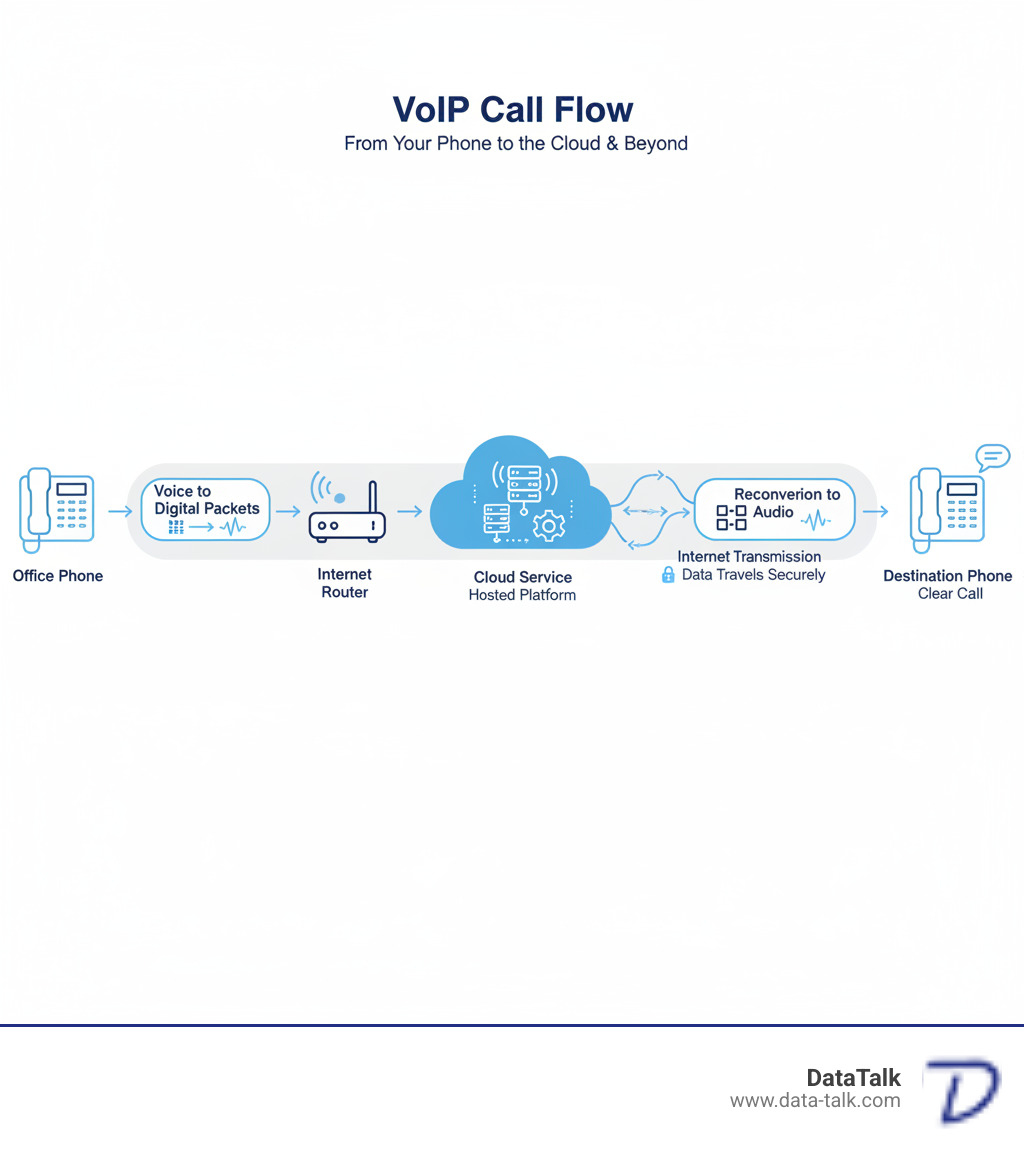
infographic showing VoIP call flow from phone through internet router to cloud service and destination, with labels for voice conversion to digital packets, internet transmission, and reconversion to audio - VoIP system features infographic

The Ultimate Guide to Essential VoIP System Features

dashboard showing various VoIP features - VoIP system features

Business communication has evolved. What once required expensive hardware can now be managed from a web browser, a revolution brought to Ohio businesses by VoIP system features.

The real power is scalability to add employees quickly, flexibility for remote and hybrid work, and support for a modern workforce that traditional systems can’t match.

Let’s walk through the VoIP system features that make this possible.

Core Call Handling & Management: Must-Have VoIP System Features

These are the foundational features that handle your daily call flow and keep your business running smoothly.

Call forwarding ensures you never miss an important call. Route calls to your mobile phone, a colleague, or any other number, ensuring you’re always reachable.

When a call needs to go to a different person, you have two options. A supervised transfer lets you speak with the recipient first to introduce the call, while a blind transfer sends it directly—perfect for internal routing.

Call routing acts as an automatic, intelligent receptionist. Route calls based on time of day, caller ID, or department needs. Send VIP clients to the front of the line or after-hours calls to an on-call phone, making your business look professional 24/7. We cover the details in our guide on Everything Business Leaders Need to Know About Call Routing.

Call hold does what you expect, but with VoIP, you can customize what callers hear, such as music or company announcements.

Call park lets you place a call in a virtual holding spot that anyone in your office can pick up. For example, park a call with an accounting question, and a colleague in that department can retrieve it from their own phone.

Voicemail-to-email delivers messages as audio files to your inbox. Even better, voicemail transcription converts them to text, so you can quickly scan messages and prioritize callbacks.

Call recording is useful for training, dispute resolution, and quality assurance. Just remember to check local laws about recording consent. For businesses handling lots of calls, we explain more in Three Crucial Reasons Why Call Recording is Necessary for Call Centers.

Call analytics and reporting provides the data to make smart decisions. See customer wait times, busiest hours, and call volumes to help you staff appropriately and identify problems.

Advanced VoIP System Features for Productivity and Customer Service

These VoIP system features lift your phone system from functional to exceptional.

An auto-attendant is your virtual receptionist, greeting callers professionally and routing them to the right place (“Press 1 for Sales, Press 2 for Support”).

IVR (Interactive Voice Response) systems let callers use voice or keypad commands to get information like account balances or business hours. The key is to keep the menu simple for a good user experience. We share important insights in 8 Things That Business Owners Should Know About IVR Systems.

When call volume spikes, call queues make callers wait in line instead of getting a busy signal, with periodic updates on their wait time.

Music on hold prevents callers from thinking they’ve been disconnected. Use this time to play music or share company promotions.

Unified Communications (UCaaS) brings voice, video, messaging, and file sharing into one platform. With the market growing over 17% annually and AI integration on the rise, UCaaS is becoming the standard for business communication. Learn how this helps smaller companies in our article How UCaaS Improves Small Business Customer Experience.

Instant messaging handles quick questions that don’t require a call or email, keeping work flowing without unnecessary interruptions.

Video conferencing is essential for remote and hybrid teams, allowing for face-to-face connection regardless of location. Features like screen sharing make communication clearer.

Mobile and desktop apps (softphones) turn any computer or smartphone into a business phone. This is crucial for hybrid teams, giving employees the same features whether at their desk or working remotely.

Bonus Features and Powerful Integrations

These VoIP system features add convenience and connect your phone system to other business tools.

Number porting lets you keep your existing phone number. You can transfer your current business numbers to your new VoIP service, so customers never notice the change.

Toll-free numbers (800, 888) make your business look established and are valuable if you serve customers across multiple states.

Custom caller ID lets you control what number appears when you make outbound calls, making them more recognizable.

E-faxing is still required in some industries like legal and healthcare. It lets you send and receive faxes via email without a physical machine and is more secure than traditional faxing.

CRM integration is a game-changer. Connecting VoIP to your CRM can trigger screen pops with customer history, log calls automatically, and enable click-to-dial. Businesses report 49% better data quality with such integrations. We’ve written a complete guide: Our Comprehensive Guide to Integrate VoIP CRM Technology at Your Business.

Microsoft Teams integration allows you to make and receive calls directly within the Teams application, unifying your communication tools.

Business application integration extends to helpdesk software, Google Workspace, and more, helping to automate workflows and eliminate duplicate data entry.

Making the Switch: A Practical Checklist for Your Business

checklist for VoIP migration - VoIP system features

Switching to VoIP doesn’t have to be overwhelming. Like upgrading to a smartphone, the benefits quickly become clear. For any Ohio business, a clear plan is the key to a successful transition.

The key is understanding what you need. We’re not talking about complicated technical jargon—just practical considerations for better business communication.

What Equipment and Internet Connection Do You Need?

VoIP’s flexibility is a major advantage. You’re not locked into one type of setup and can mix and match what works for your team.

IP phones are desk phones built for internet calling. They connect to your network via an Ethernet cable or Wi-Fi. Costs range from $80 for a basic model to $600 for an advanced phone with more features, suitable for receptionists or executives.

If you have analog phones, Analog Telephone Adapters (ATAs) can bridge the gap. These devices convert the analog signal to digital data for your VoIP service, offering a budget-friendly way to transition.

Softphones are applications that turn your computer or smartphone into a business phone, with no desk phone needed. Softphones are game-changers for hybrid and remote work arrangements.

VoIP relies completely on your internet connection. Unlike traditional phones powered by copper lines, VoIP requires a solid broadband connection (cable, DSL, or fiber) and power to your network equipment.

How much internet speed do you need? Each VoIP call uses about 100 Kbps of bandwidth. If you have 10 simultaneous calls, you’d need about 1 Mbps dedicated to voice traffic, which is modest by today’s standards.

However, speed isn’t everything. Quality of Service (QoS) is just as important. QoS tells your network to prioritize voice traffic, preventing choppy audio and dropped calls. This acts like a carpool lane for your phone calls on your network. For a deeper dive, check out Everything Columbus, Ohio Entrepreneurs Should Know About VoIP QoS.

Power over Ethernet (PoE) is another useful feature. Many IP phones can get power through the same Ethernet cable that carries data. This simplifies installation by eliminating separate power adapters and can keep phones running during power hiccups if your network switch has battery backup. To understand why this matters, read What Exactly is PoE and Why is it Important?.

Understanding Costs, Security, and Reliability

VoIP typically saves businesses a significant amount of money compared to traditional phone systems.

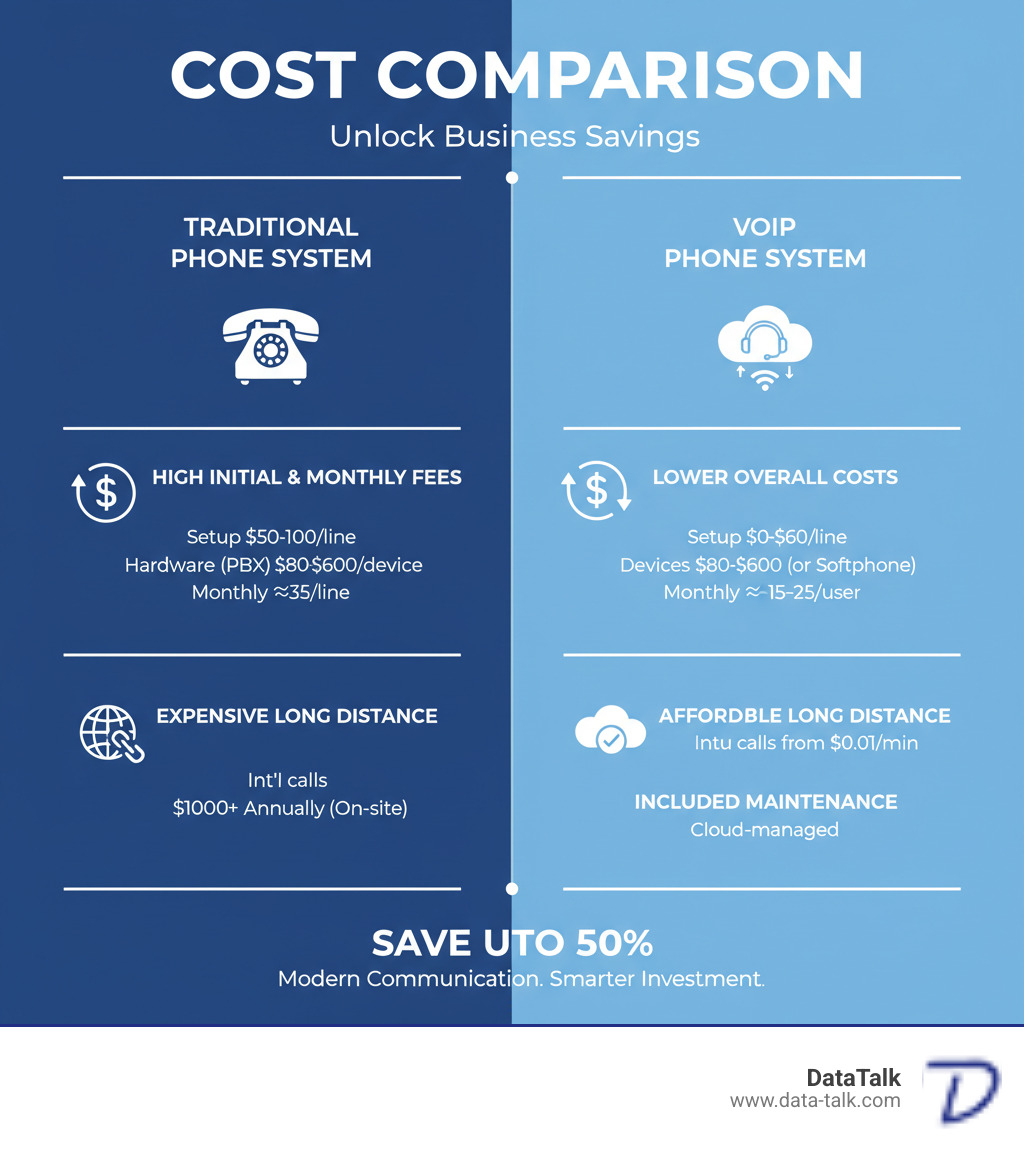
Traditional systems often cost around $35 per line monthly plus hidden fees, with expensive installation and hardware. Long-distance and international calls add up quickly.

VoIP flips that model. Most businesses pay between $15 and $25 per user per month. Setup costs are lower, and international calls can be as little as $0.01 to $0.04 per minute. Many businesses reduce their phone costs by up to 50%.

Here’s a comparison that shows the real difference:

Feature Traditional Phone System VoIP Phone System
Monthly Costs ~$35 per line + hidden fees ~$15-$25 per user per month
Initial Costs Installation $50-100 per drop $0-$60 per line (setup)
Device Costs High, often proprietary PBX hardware $80-$600 per IP phone (or use softphones)
Long Distance Expensive, especially international International as low as $0.01-$0.04 per minute
Maintenance $1000+ annually for contracts, on-site Often included in monthly fee, cloud-managed
Overall Savings Higher Reduces call costs by up to 50%

infographic comparing VoIP costs to traditional phone systems - VoIP system features infographic

Security is a valid concern, as your voice data travels over the internet.

Modern VoIP systems use call encryption (SIP-TLS and SRTP) to protect both signaling and audio from eavesdropping. This encryption ensures conversations remain private. Reputable providers also implement robust network security like firewalls and intrusion detection. Strong authentication protects access to your VoIP system features. For a comprehensive look, read Is Your VoIP Phone System Secure?.

What about reliability? Modern cloud-based VoIP systems are designed for exceptional reliability, with many providers offering 99.999% uptime guarantees (about 5 minutes of downtime per year). This is achieved through redundant data centers and 24/7 monitoring.

Features like local survivability and automatic failover maintain calling capabilities during outages by redirecting calls to mobile phones or other locations. In practice, a well-configured VoIP system is often more reliable than traditional phone lines, which are vulnerable to physical damage and outdated infrastructure. For detailed guidance, explore Are You Prepared? Business Continuity and Disaster Recovery.

At DataTalk, our VOIP Scout Test guarantees your network is ready for optimal voice quality before we deploy anything. We ensure your experience with VoIP exceeds expectations from day one.

Frequently Asked Questions About VoIP

mobile phone with 911 call - VoIP system features

We talk to business owners every day who have great questions about how VoIP works. We understand you need to know how it handles critical functions like emergency calls and keeping your existing phone numbers. Let’s walk through the most common questions.

How does VoIP handle emergency 911 calls?

This is a critical question. Your ability to reach emergency services is paramount.

VoIP handles 911 calls differently than landlines, but the FCC requires interconnected VoIP providers to offer Improved 911 (E911) service. Here’s what you need to know.

When you set up your VoIP service, you’ll perform an address registration for the physical location where you’ll use it. This address is transmitted to dispatchers when you dial 911. Unlike landlines, where the address is tied to a physical line, VoIP requires you to keep this information current.

If you move a VoIP device to a new location (like a home office), you must update your registered address. Otherwise, emergency services could be sent to your old address.

Mobile app limitations are also important. VoIP mobile apps use your registered address for E911, not your phone’s GPS. For this reason, always use your mobile phone’s native dialer for 911 calls when you are not at your registered location, as it provides more accurate location data.

There’s also the power outage consideration. Since VoIP requires electricity, your phone service won’t work during a power outage unless you have a battery backup for your modem and network equipment.

The FCC has established clear requirements for VoIP providers, including expanding local number portability. You can read more about the FCC rules on number portability for regulatory details.

Can I keep my existing phone number when I switch?

Yes! This is one of the easiest parts of switching to VoIP.

The process is called number porting (or Local Number Portability). It allows you to transfer your current business phone numbers—local, toll-free, or fax—from your old provider to your new VoIP service.

FCC rules require your old provider to release your numbers, so they cannot hold them hostage.

Here’s how the porting process works: You’ll sign a Letter of Authorization (LOA), and your new VoIP provider will coordinate the transfer directly with your old provider. We handle all the paperwork.

When done correctly, there is no service interruption. Your phones work throughout the transition, and your contacts won’t notice a thing. We ensure this process is seamless for our Ohio clients.

What are the main advantages and disadvantages of VoIP?

For most modern businesses, the benefits of VoIP far outweigh the drawbacks.

On the advantages side, the cost savings are substantial. Businesses often reduce phone costs by up to 50%, with typical per-user monthly fees of $15-$25. This price usually includes advanced features like auto-attendants, call queues, and video conferencing that cost extra on traditional systems.

Flexibility and scalability are also key benefits. Your phone system grows with you, allowing you to easily add new users or locations. This adaptability is invaluable for today’s hybrid and remote work environments.

From a customer service perspective, features like IVR and call analytics help you handle inquiries more professionally and efficiently.

Now for the disadvantages. The biggest is internet dependency. VoIP depends on your internet connection. An outage can disrupt service unless failover solutions are in place. That’s why our VOIP Scout Test is crucial to verify your network’s readiness.

Power outage risk is another factor. Without backup power for your internet equipment, you won’t have phone service. Traditional landlines don’t have this vulnerability.

The E911 differences we discussed require you to keep your address information current.

Finally, a poor internet connection can cause call quality problems. However, potential call quality issues are preventable with proper network preparation. A well-configured network with adequate bandwidth and QoS delivers excellent call quality, often superior to traditional lines.

Most disadvantages can be managed or eliminated with proper planning and setup, which is where an experienced provider makes all the difference.

Conclusion: Is Your Business Ready for the VoIP Revolution?

graphic of a modern, interconnected business communication network - VoIP system features

From core features to the logistics of making the switch, it’s clear that upgrading to VoIP is more than just swapping out old phones.

The shift to VoIP is about future-proofing your business communications. The ability to handle calls from anywhere, integrate with your CRM, and scale on demand positions your business to thrive in a digital world.

And here’s the reality: traditional landlines are on their way out. The FCC has already announced plans to phase out old phone regulations, signaling the end of an era. For Ohio businesses, this isn’t a distant concern. The question is not if you’ll switch to VoIP, but when—and whether you’ll do it proactively or be forced to scramble later.

We understand the biggest worry is reliability. Will calls be clear? Will the system be dependable? These are fair questions, and it’s why we do things differently at DataTalk.

Before we deploy any VoIP system, we run our VOIP Scout Test on your network. This proactive assessment checks your internet connection and network infrastructure to guarantee that your voice quality will be crystal-clear from day one. We don’t just sell a phone system; we ensure your network is ready to support it. That’s our guarantee: no surprises, no choppy calls, and no regrets.

The businesses we work with across Ohio are using advanced VoIP system features like video conferencing and unified communications to work smarter, serve customers better, and grow faster. They’re saving money while gaining capabilities that traditional phone systems could never offer.

So, is your business ready? If you’re tired of being limited by outdated technology and want a phone system that works as hard as you do, then yes—you’re ready.

Explore our Business Phone Systems and let’s talk about how we can ensure a smooth, successful transition for your team.

Unifying Your Comms: Why a Hybrid IP PBX Might Be Your Next Big Move

Why Your Business Communication Needs an Upgrade


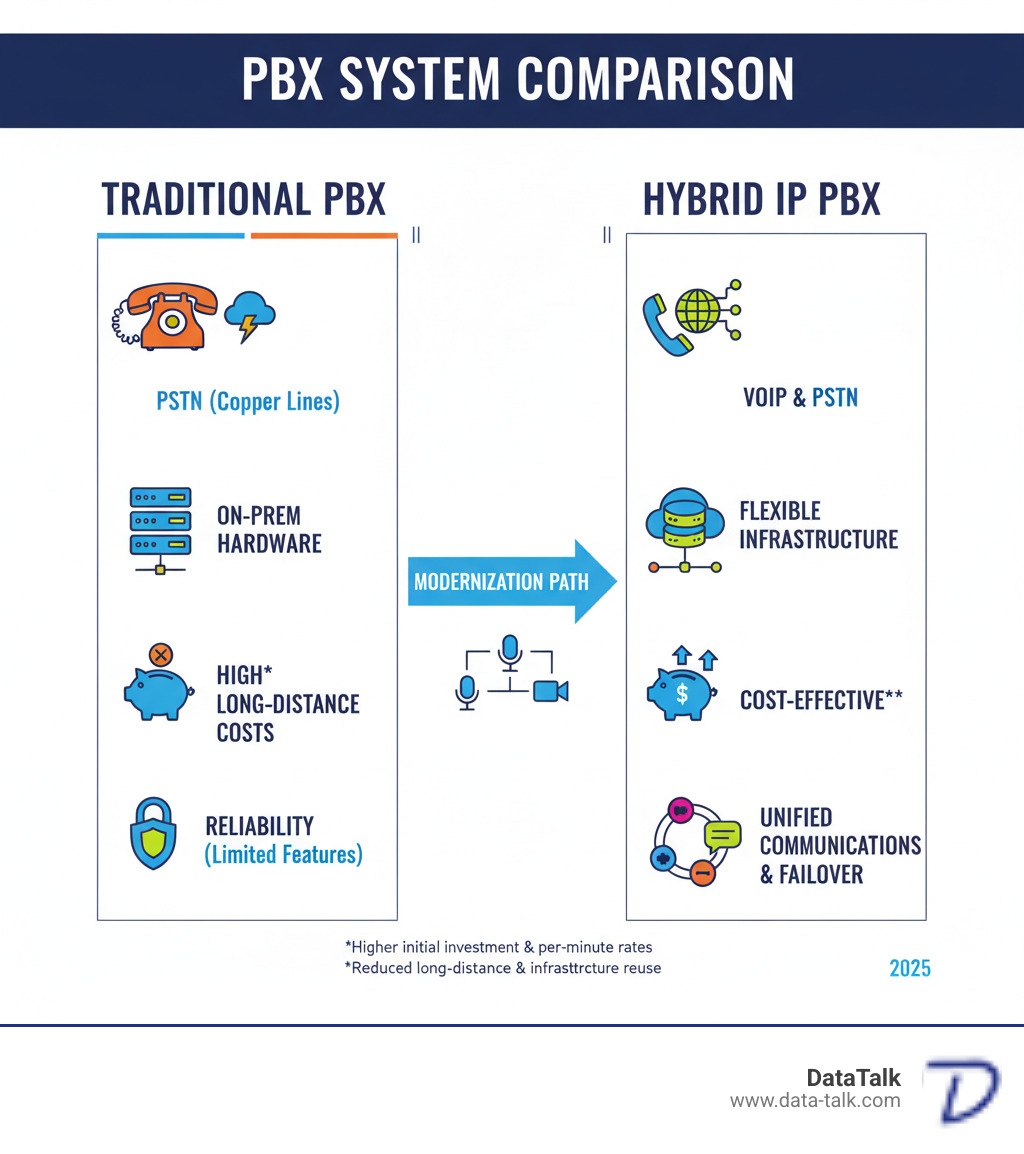
A hybrid IP PBX phone system combines traditional PBX hardware with modern VoIP (Voice over Internet Protocol) technology. This approach allows you to keep your existing phone infrastructure while adopting internet-based calling, giving you the reliability of analog lines with the flexibility and cost savings of digital communication.

Quick Definition:

  • Traditional PBX hardware handles on-site phone switching and connects to standard phone lines.
  • VoIP technology routes calls over your internet connection for lower costs and advanced features.
  • Intelligent routing automatically chooses the best path for each call—VoIP first, then traditional lines as backup.
  • Unified platform manages everything through a single system.

For many Ohio businesses, choosing a phone system is a frustrating compromise. Pure cloud systems fail when the internet drops, while traditional PBX systems lack modern features and have high long-distance costs. A hybrid IP PBX solves this by providing a safety net. You get local survivability when the internet goes down, plus modern features like video conferencing, mobile integration, and remote worker support.

You can keep your existing phone lines and equipment while moving to VoIP at your own pace. With the right partner and a proper network assessment, like DataTalk’s VOIP Scout Test, you can implement a system that works reliably today while preparing your business for tomorrow.

What is a Hybrid IP PBX and How Does It Work?

A hybrid IP PBX is a business phone system designed for companies that want modern features without abandoning their reliable traditional phone lines. It seamlessly integrates old and new technology, allowing you to keep existing equipment like desk phones and wiring while adding capabilities like internet calling and video meetings.

A hybrid system consists of several core components working together:

  • PBX Hardware: The on-site “brain” of the system, typically in a server room, that routes calls.
  • VoIP Gateways: Translators that convert voice signals between the analog phone network and the digital internet.
  • SIP Trunks: Virtual phone lines that run over your internet connection, significantly reducing costs compared to traditional lines.
  • IP Phones: Modern desk phones that connect directly to your computer network and offer advanced features.

All these pieces function as a single, unified system. From an employee’s perspective, a call is just a call—the technology behind it works automatically.

server rack with PBX hardware and network switches - hybrid ip pbx

The Technology Behind the System

A hybrid system uses two key technologies side-by-side:

VoIP (Voice over Internet Protocol) converts your voice into digital packets and sends them over the internet. This enables low-cost long-distance calls, video conferencing, and the flexibility for employees to make calls from a desk phone, computer, or mobile app. However, it relies entirely on a stable internet connection.

PSTN (Public Switched Telephone Network) is the traditional phone network using copper wires. It’s incredibly reliable and works even during internet or power outages, making it an essential backup.

A hybrid IP PBX intelligently routes calls based on your internet quality. When the connection is strong, it uses VoIP to save money. If the internet becomes unstable or goes down, it automatically switches to PSTN lines. This failover provides local survivability, ensuring your business phones in Ohio stay operational no matter the weather or network conditions.

Unifying Communication Channels

A hybrid IP PBX excels at bringing all your communication channels into a single platform, eliminating the inefficiency of juggling multiple disconnected systems. It unifies essential tools like:

  • Voice Calls: Handled through desk phones, whether routed via VoIP or PSTN.
  • Video Conferencing: Often built-in, removing the need for separate subscriptions.
  • Instant Messaging: For quick internal communication.
  • Voicemail-to-Email: Delivers voicemails as audio files to your inbox for easy access.

When integrated with business software like a CRM, the system becomes even more powerful. Customer information can pop up on-screen during a call, and all communications can be managed from one interface. This unified approach makes your team more responsive and ensures consistent connectivity for employees, whether they’re in the Columbus main office, working from home in Cleveland, or at a satellite location in Cincinnati.

For a deeper dive into how these integrated systems work together, check out this guide to hybrid communication solutions.

Comparison of PBX Systems - hybrid ip pbx infographic

The Strategic Advantages of a Hybrid System

A hybrid IP PBX is a strategic decision that provides a measured path to modern communications while protecting your existing investments. Key advantages include:

  • Cost-Effectiveness: By leveraging your existing infrastructure—wiring, phone lines, and equipment—you avoid the cost of a complete overhaul. Routing long-distance calls over the internet via VoIP also generates significant monthly savings.
  • Scalability: A hybrid system grows with your business. Adding new extensions or integrating a new office in Clintonville is straightforward, allowing you to scale from a few users to hundreds on the same platform.
  • Flexibility: You can transition to VoIP at your own pace. A hybrid system lets you adopt modern features like video conferencing and mobile integration without abandoning the reliability of traditional phone lines.
  • Business Continuity: This is where hybrid systems excel. With built-in redundancy and local survivability, your phones keep working even if the internet goes down. Calls automatically failover to traditional lines, ensuring you never miss a customer call.

diverse team collaborating, some in-office and some remote - hybrid ip pbx

Improved Reliability and Uptime

Phone system downtime costs money and damages customer trust. A hybrid IP PBX delivers superior reliability through automatic failover protection. The system constantly monitors your internet and reroutes calls to traditional PSTN lines the moment a problem is detected, with no manual intervention required. This redundancy, which can include backup 4G LTE connections or dedicated copper lines, provides significantly higher uptime—often well above 99.9% when properly configured—by ensuring calls can continue even during internet disruptions.

Furthermore, voice-optimized call routing intelligently selects the best path for every call, ensuring clarity and efficiency. The local survivability feature also means your internal team can still call each other even during a complete internet outage. For more details, you can read about hybrid platform reliability.

Cost Implications: Investment and ROI

While the upfront investment for a hybrid IP PBX (including hardware and professional installation) can be higher than a cloud-only solution, it often delivers a better long-term return on investment (ROI). By owning the equipment rather than renting a service, you achieve lower ongoing costs.

The real financial win comes from long-term savings. You continue to get value from existing infrastructure, long-distance charges are drastically reduced, and a phased migration budget allows you to upgrade gradually. This approach optimizes spending and builds a sustainable system that makes financial sense. Before any investment, DataTalk’s VOIP Scout Test can verify your network is ready to handle high-quality voice traffic, ensuring your investment performs as expected.

Is a Hybrid PBX Right for Your Business?

A hybrid IP PBX is an ideal solution for many Ohio businesses, but it’s important to assess your specific needs. Consider these factors:

  • Current Pain Points: Are you experiencing dropped calls due to unstable internet or facing high long-distance charges?
  • Legacy Equipment: Do you have a significant investment in existing analog phones or building wiring that you want to keep using?
  • Workforce Distribution: Do you have a mix of in-office staff, remote employees, or multiple locations across Ohio?
  • Growth Plans: Are you planning to add staff or open new offices and need a system that can scale easily?

A hybrid system is particularly valuable for industries like healthcare, manufacturing, hospitality, education, and multi-location businesses that require high reliability, need to integrate existing infrastructure, and want to centralize communications.

Key Features to Look for in a Hybrid IP PBX System

When evaluating a hybrid IP PBX, focus on features that solve real business problems:

  • Call Management: Look for an auto-attendant for professional greetings, call queues to manage high volume, and an IVR system to let callers self-serve.
  • Unified Messaging: Voicemail-to-email is a must-have feature, delivering messages as audio files to your inbox for access anywhere.
  • CRM Integration: The ability to integrate with your CRM and other platforms like Microsoft Teams is crucial. This allows for features like on-screen caller information and click-to-call functionality.
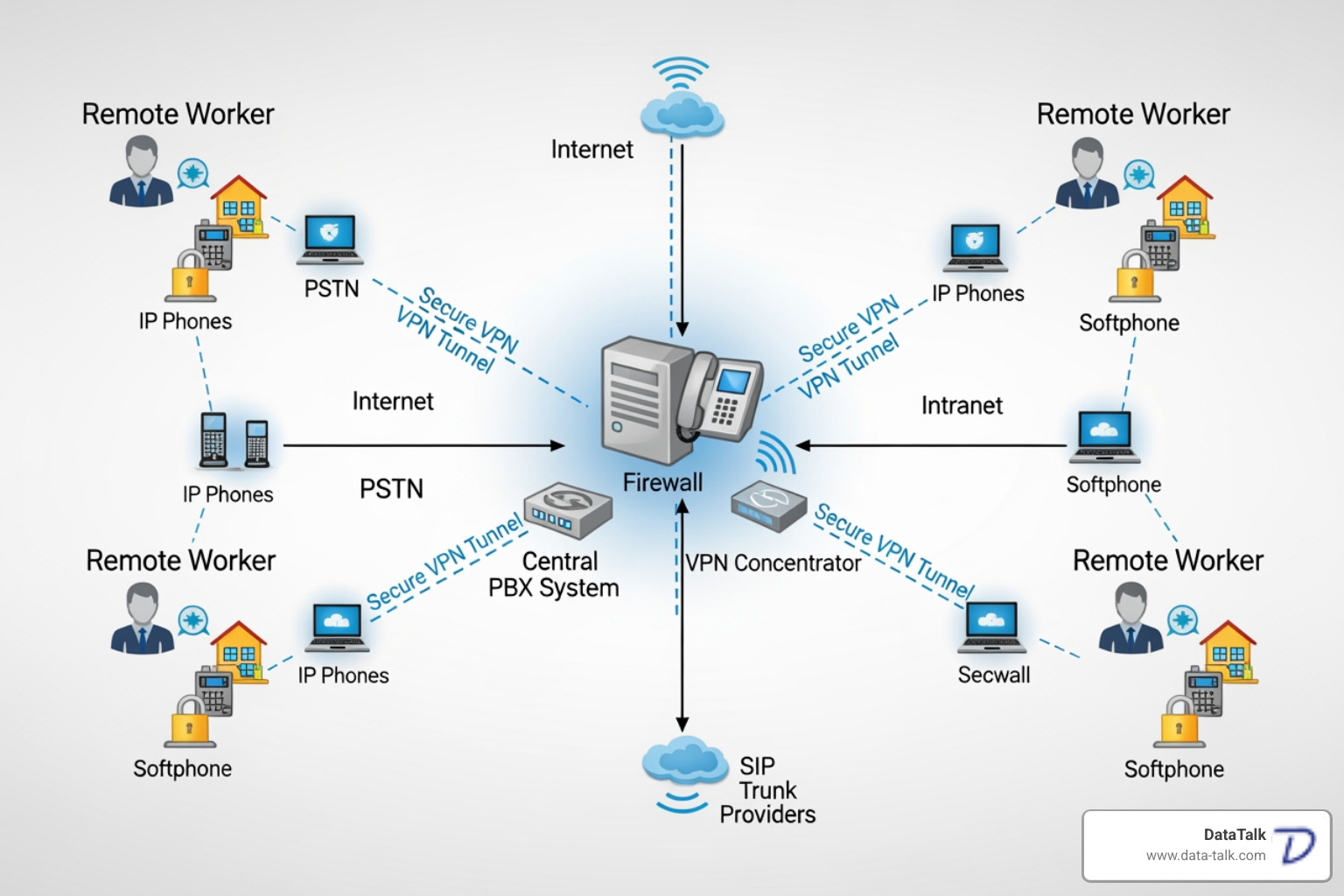
  • Remote Worker Support: The system should provide secure, seamless access for remote employees without complex VPNs, allowing IP phones to work from home as if they were in the office.
  • Conference Bridging: Built-in virtual conference rooms and video conferencing capabilities are essential for team collaboration across different locations.

Potential Drawbacks and Challenges

While powerful, a hybrid IP PBX has considerations to keep in mind:

  • Implementation Complexity: Integrating traditional and VoIP technologies requires professional expertise. A DIY approach can lead to integration and compatibility issues.
  • Higher Initial Cost: The upfront investment in hardware and professional installation is typically higher than for a pure cloud solution. However, this is often offset by long-term savings and increased reliability.
  • Maintenance Requirements: A hybrid system requires some on-premise oversight, including software updates and hardware monitoring, though less than a fully traditional PBX.

Working with an expert partner like DataTalk mitigates these challenges. Our VOIP Scout Test ensures your network is ready for high-quality voice before installation, preventing common performance pitfalls and guaranteeing your hybrid system delivers on its promise.

Implementation and Security Best Practices

A successful hybrid IP PBX deployment depends on a methodical implementation process and robust security.

The process begins with a thorough infrastructure assessment, where a provider examines your cabling, network components, and internet connectivity. At DataTalk, our unique VOIP Scout Test guarantees your network can support optimal voice quality before any equipment is installed. This is followed by professional installation and configuration, where experts connect the hardware and software, set up call routing, and test failover scenarios.

A key benefit of a hybrid system is its support for a distributed workforce. It simplifies secure access for remote workers and provides centralized management for multi-location businesses. Whether your offices are in Columbus, Cincinnati, or Cleveland, you can manage all users, settings, and phones from a single web-based interface, reducing administrative complexity and cost.

network diagram showing secure connections for remote workers - hybrid ip pbx

Security Considerations for Your Hybrid IP PBX

Securing your internet-connected phone system is critical. A hybrid IP PBX requires a multi-layered security approach to protect your conversations and data. Key measures include:

  • Encryption: Use protocols like SRTP and TLS to scramble voice data, making conversations unintelligible to eavesdroppers.
  • Firewalls: A properly configured firewall acts as a gatekeeper, blocking unauthorized access and malicious traffic.
  • Secure Remote Access: Use VPNs or other secure connection methods to create an encrypted tunnel for remote workers, protecting data in transit.
  • Intrusion Detection Systems: These systems monitor network traffic for suspicious activity and alert you to potential threats before they cause damage.
  • Regular Software Updates: Keeping your PBX firmware and software up-to-date is essential for patching security vulnerabilities.
  • Strong Access Policies: Enforce complex passwords and use multi-factor authentication (MFA), especially for administrative accounts, to prevent unauthorized access.

DataTalk helps Ohio businesses implement these security best practices during deployment, ensuring your communication system is both powerful and protected.

Frequently Asked Questions about Hybrid PBX Systems

Here are answers to common questions Ohio business owners have about hybrid IP PBX systems.

Is a traditional PBX system obsolete?

Not at all. While technology is shifting to IP-based solutions, a traditional PBX is not obsolete. Its role has evolved. In a hybrid setup, it serves as a reliable foundation, protecting your initial investment. This allows for a gradual transition to modern features, using your existing equipment as a dependable backup and transitional tool.

How does a hybrid system support remote workers?

A hybrid IP PBX is ideal for remote work. Through secure IP phone registration and cloud services, remote employees can connect their phones to the main office system without complex VPNs. They get seamless access to all features—call transfers, voicemail, conferencing—as if they were in the office. This provides a unified experience for your entire team, no matter where they are. For more details, see this Information on hybrid VoIP systems for remote work.

Can I use my existing analog phones and wiring?

Yes. This is a major advantage of a hybrid system. It’s built for compatibility with analog, digital, and VoIP technologies. You can continue using your existing analog phones and wiring, often with the help of Analog Telephone Adapters (ATAs). This approach allows for phased hardware upgrades, protecting your infrastructure investment and letting you mix phone types to suit different user needs and budgets.

Conclusion: The Future-Proof Bridge to Modern Communication

For businesses in Ohio, from Columbus to Akron and Cincinnati, a hybrid IP PBX offers a powerful solution. It combines the reliability of traditional phone lines with the cost savings and advanced features of modern VoIP. You gain scalability, flexibility, and the peace of mind that comes with local survivability—your phones work even when the internet doesn’t.

A hybrid system unifies voice, video, and messaging, supports remote and multi-location workforces, and is built to adopt future innovations like AI-powered call routing and deeper application integration. It’s a strategic choice that positions your business for growth without unnecessary risk.

At DataTalk, we ensure your success from day one. Our unique VOIP Scout Test verifies your network’s readiness for crystal-clear voice quality before deployment, taking the guesswork out of the process. We build systems that are reliable today and ready for tomorrow.

Ready to upgrade your business communications the right way? Explore modern telephony systems for your business with DataTalk, and let’s build a solution that fits your unique needs.

Cabling Clarity: Your Complete Guide to Structured Network Setup

The Blueprint for Business Connectivity


Structured cabling installation is the design and implementation of a standardized telecommunications infrastructure connecting all your business devices—computers, phones, security cameras, and wireless access points—through an organized network of cables and hardware. The process involves:

The 5 Core Steps:

  1. Planning and Design: Assess current and future needs, map cable routes, and plan for scalability.
  2. Component Selection: Choose appropriate cable types (Cat5e, Cat6, Cat6a, or fiber) and hardware.
  3. Physical Installation: Pull cables, terminate connections, and organize the system.
  4. Testing and Certification: Verify each cable meets performance standards.
  5. Documentation: Create detailed records for future reference.

For small businesses in Ohio upgrading to VoIP or struggling with unreliable phone systems, this process is critical. A properly installed structured cabling system can last 15-20 years, serving as the foundation for all voice, data, and video communications.

Think of it as the central nervous system of your organization. Without it, you face disconnections, slow data, and the nightmare of tangled “spaghetti” wiring that’s impossible to troubleshoot.

Unlike old point-to-point wiring, which creates congestion, structured cabling uses a standardized approach. It replaces chaos with organization, making your network manageable, reliable, and ready to grow. For businesses adopting modern VoIP systems, this infrastructure is essential for voice quality and network reliability.

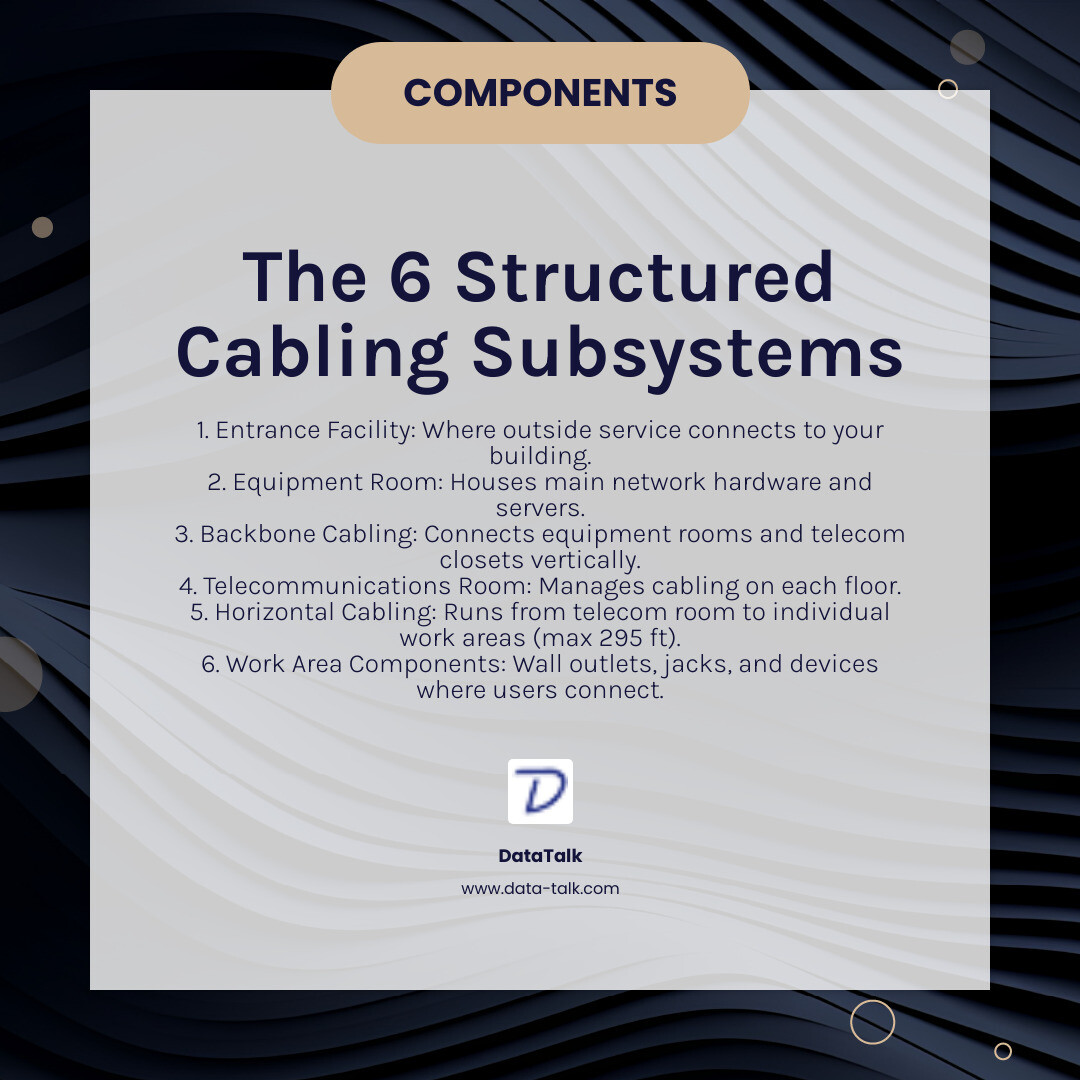
Infographic showing the 6 subsystems of structured cabling: Entrance Facility (where outside service connects to your building), Equipment Room (houses main network hardware and servers), Backbone Cabling (connects equipment rooms and telecom closets vertically through building), Telecommunications Room (manages cabling on each floor), Horizontal Cabling (runs from telecom room to individual work areas, max 295 feet), and Work Area Components (wall outlets, jacks, and devices where users connect) - Structured cabling installation infographic simple-info-card-dark

The Anatomy of a Structured Cabling System

Understanding the core parts of a modern network’s physical layer makes the structured cabling installation process much clearer.

The 6 Core Components

A professional structured cabling system consists of six distinct subsystems:

  1. Entrance Facility: The point where your internet service provider’s cables connect to your building’s internal network.
  2. Equipment Room: The central hub housing critical network hardware like servers, switches, and routers.
  3. Backbone Cabling: High-capacity cabling, often fiber optic, that connects equipment rooms and telecommunications rooms between floors or buildings.
  4. Telecommunications Room: An area on each floor that contains patch panels and equipment to manage cabling for that specific zone.
  5. Horizontal Cabling: The cables running from the telecommunications room to individual workstations, with a maximum length of 295 feet (90 meters) to maintain signal quality.
  6. Work Area Components: The final connection points, including wall outlets, jacks, and patch cables that connect user devices like computers and VoIP phones.

Low-Voltage Cable Types and Their Roles

Low-voltage wiring (50 volts or less) is used for data transmission. The most common types are:

  • Copper Cabling: Twisted-pair Ethernet cables are the standard for most office networks.
    • Cat5e: Supports speeds up to 1 Gbps. Suitable for basic office needs but less common in new installations.
    • Cat6: A solid middle-ground option that can handle 10 Gbps speeds over shorter distances (up to 180 feet).
    • Cat6a (“augmented”): The modern standard for structured cabling installations, reliably supporting 10 Gbps over the full 300-foot distance.
  • Fiber Optic Cabling: Uses light pulses through glass strands for much higher bandwidth and longer distances. It’s ideal for backbone connections between buildings or floors.

These cables connect everything from computers and security cameras to VoIP phones and the Wi-Fi access points that power your wireless network. With Power over Ethernet (PoE), a single network cable can provide both data and power to devices like phones and cameras, simplifying installation. For a deeper dive, see our page: What is PoE and Why is it Important?

Key Standards for Reliability and Compliance

A professional structured cabling installation adheres to strict industry standards to ensure reliability and performance.

  • The TIA/EIA standards (especially ANSI/TIA-568) are the rulebook for North American installations, defining everything from cable types and distances to termination patterns (T568A/T568B).
  • ISO/IEC 11801 is the international equivalent, covering data, voice, and video services.
  • BICSI (Building Industry Consulting Service International) provides detailed training, certification, and installation guidelines that are considered the gold standard. Their cabling installation manual is a key industry resource.

Following these standards guarantees interoperability, performance, future-proofing, and safety for your business communications. It’s how we ensure your network will be reliable for the next 15 to 20 years.

The 5-Step Structured Cabling Installation Process

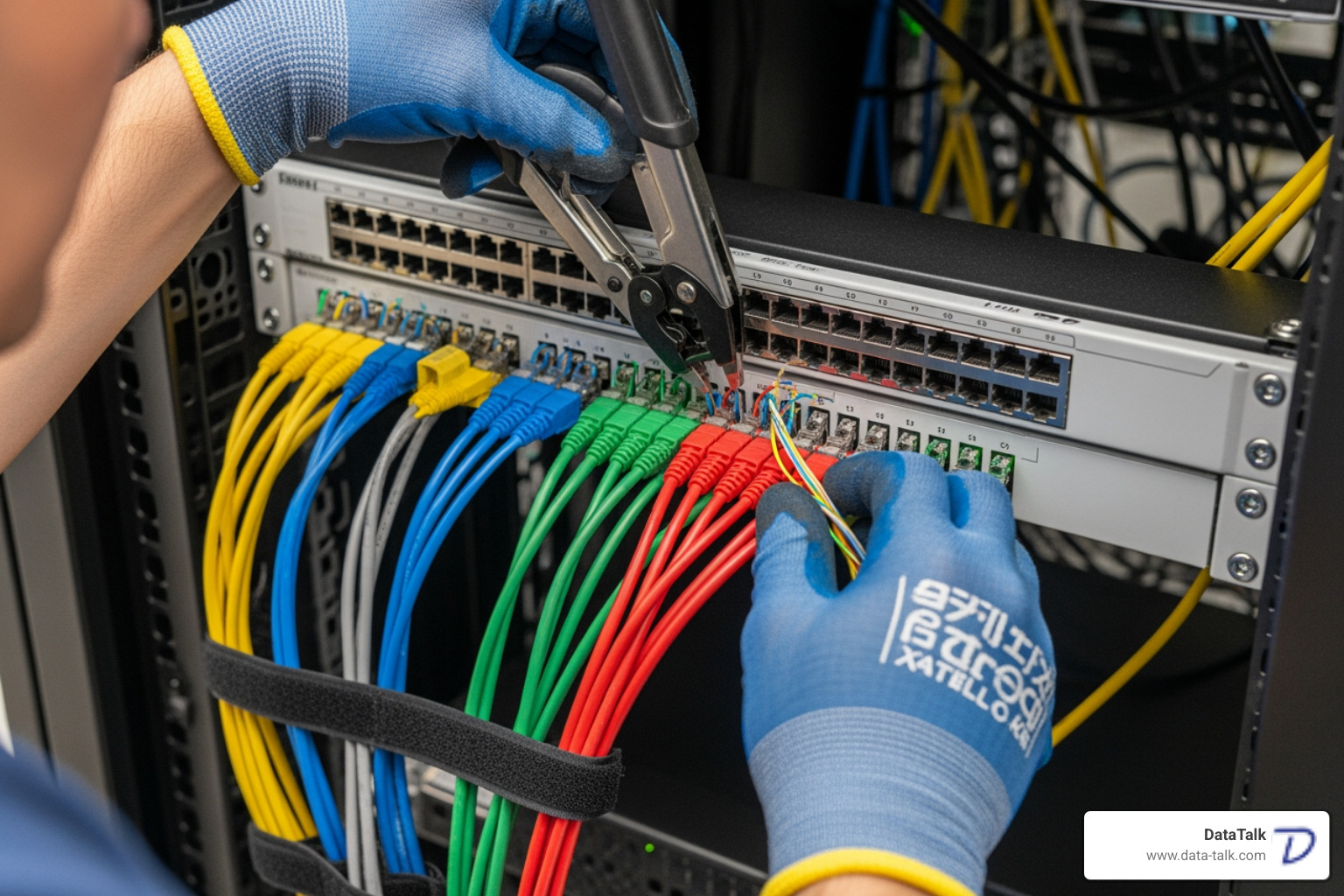
Technician neatly terminating cables into a patch panel - Structured cabling installation

A professional structured cabling installation follows a precise, methodical process to build a network foundation that can support your business for 15-20 years.

Step 1: Planning and Design Considerations

Before any cables are pulled, we conduct a thorough planning phase. This involves understanding your current and future needs, including employee growth, VoIP phone systems, and bandwidth requirements for applications like video conferencing. We perform a floor plan analysis to map out device locations, identify obstacles, and design efficient cable pathways. This ensures the server room is properly located and the entire system is designed for scalability.

Step 2: Component Selection

With a solid plan, we select the right components. Cable category selection (e.g., Cat6a for future-proofing or fiber for backbones) is based on your performance needs. We use high-quality, certified patch panels, jacks, and connectors that match the cable category to avoid bottlenecks. Equipment is organized in racks and cabinets, and proper cable management hardware like J-hooks and trays protects cables and maintains bend radius. Using quality materials that meet TIA/EIA-568 standards is non-negotiable for long-term reliability.

Step 3: The Physical Structured Cabling Installation

Our certified technicians then execute the plan. Cable pulling is done carefully, keeping tension below 25 pounds to prevent damage. We adhere to the cable’s minimum bend radius and keep data cables away from sources of electrical interference, such as power lines and fluorescent lights. Each cable is precisely connected during termination at patch panels and wall jacks, following a consistent standard (T568A or T568B). Every cable and port is given a clear label for easy identification, and we implement proper firestopping where cables pass through fire-rated walls to maintain building safety.

Step 4: Testing and Certification

An installation is only complete once every connection is tested and certified. We use advanced equipment to perform wiremap testing (checking for shorts or crossed pairs), length verification, and comprehensive performance testing. This measures key metrics like crosstalk (NEXT) and attenuation (signal loss) to prove the installation meets or exceeds ANSI/TIA-568 standards. You receive detailed certification reports for every cable, guaranteeing performance and validating warranties.

Step 5: Documentation and Maintenance

Proper documentation is essential for future management. We provide comprehensive network diagrams, a detailed cable labeling scheme, and all test results. As-built drawings reflect the final, installed layout. Finally, we recommend a maintenance schedule to conduct periodic inspections, ensuring your investment remains reliable for its full 15-20 year lifespan.

Strategic Planning: Cost, Timing, and Finding a Pro

Project manager reviewing blueprints with a client - Structured cabling installation

Making the right business decisions for your cabling project is as important as the technical work. Getting the timing and partner right is key to staying on budget and avoiding frustration.

When to Install or Upgrade Your System

The timing of your structured cabling installation can significantly impact cost and disruption. The ideal times to install or upgrade are:

  • During new building construction or major renovations when walls are open and access is easy.
  • When planning an office relocation, allowing you to start fresh with a system designed for your needs.
  • If you are expanding your network to support more users or bandwidth-heavy applications.
  • When facing persistent connectivity issues like slow speeds or frequent downtime.

How to Choose the Right Cabling Installer

Not all installers are created equal. To find a reliable partner, look for:

  • Specific experience and expertise in structured cabling.
  • Industry certifications, especially from BICSI, which prove adherence to current standards.
  • Proper insurance and licensing to protect your business.
  • Positive customer references from businesses similar to yours.
  • A comprehensive quote with no hidden fees.

For more guidance, see our article on 4 Things to Consider When Choosing the Right Cabling Company.

Understanding Structured Cabling Installation Costs

A structured cabling installation is a long-term investment. Costs vary based on several factors, but here are some ballpark figures:

Office Size Square Footage Typical Cost Range
Very Small Office Under 1,000 sq ft $2,000 – $5,000
Medium Office 5,000 – 10,000 sq ft $7,500 – $15,000
Larger Facilities 20,000+ sq ft $25,000 – $50,000+
Multi-Floor / Campus Multiple buildings/floors $100,000+

These are estimates; your actual costs will vary.

Key cost factors include cable type (fiber costs more than copper), the number of drops (outlets), site complexity (new build vs. retrofitting), and labor rates. While the upfront cost may seem high, a professional installation provides value by reducing downtime, simplifying troubleshooting, and creating a scalable foundation that lasts 15-20 years. It’s a smart investment, not just an expense.

Debunking Myths and Future-Proofing Your Network

Let’s clear up some common misunderstandings about structured cabling installation and highlight its long-term value.

Common Misconceptions About Structured Cabling

  • Myth: Wireless makes wires obsolete. Reality: Even the best wireless networks rely on a wired backbone of structured cabling to connect access points and handle heavy traffic. A wired connection offers superior speed, reliability, and security.
  • Myth: It’s only for large enterprises. Reality: An organized cabling system benefits any business, regardless of size, by improving efficiency, simplifying troubleshooting, and preparing for future growth.
  • Myth: All cables are the same. Reality: Cable types like Cat5e, Cat6a, and fiber have significant differences in performance. Using the wrong one can create a network bottleneck.
  • Myth: It’s a cost with no ROI. Reality: A professional installation delivers a high return on investment (ROI) by reducing costly downtime, increasing productivity, and eliminating the need for frequent, expensive overhauls.

The Long-Term Benefits of a Professional Setup

A professional structured cabling installation is a strategic investment in your business’s future. Key benefits include:

  • Scalability and Flexibility: Easily add new users or adapt to new technologies without a complete system overhaul.
  • Reduced Network Downtime: High-quality, organized cabling minimizes connectivity issues and boosts productivity.
  • Simplified Troubleshooting: Clear labeling and organization mean network problems are resolved in minutes, not hours.
  • Improved Performance: Adherence to standards ensures your network supports demanding applications with optimal speed.
  • High ROI: The initial investment pays for itself through increased efficiency and avoided costs from network failures.
  • Future-Proofing: A modern system can support multiple generations of hardware, ensuring longevity.
  • Longevity (15-20 years): A properly installed system is a long-term asset that can serve your business for up to two decades.

For a deeper dive, explore our article: Top Benefits of Structured Cabling Services That Business Leaders Should Know.

Frequently Asked Questions about Structured Cabling

How long does a structured cabling installation take?

The timeline for a structured cabling installation depends on the project’s size and complexity.

  • Small Office (10-15 drops): Typically 3 to 5 days.
  • Mid-Sized Office: May take 2 to 4 weeks.
  • Large Facility or Campus: Can take several months.

Factors like building complexity and the need to work around business hours can influence the schedule. A professional installer will provide a realistic timeline upfront and work to minimize disruption.

How long does a structured cabling system last?

A professionally installed system using quality components is a long-term investment. You can expect it to last 15 to 20 years. Over that time, you may upgrade computers, switches, and phones multiple times, but the underlying cabling infrastructure will continue to support each new generation of technology. This longevity is why following standards and using certified materials is so critical.

Can structured cabling support wireless networks?

Yes, absolutely. In fact, a robust wireless network is dependent on a high-quality wired backbone. Every Wi-Fi access point in your office requires a physical Ethernet cable to connect it to the main network. This cable provides both the data connection and, in most cases, power via Power over Ethernet (PoE). Better structured cabling leads to better, more reliable wireless performance.

Conclusion: Building a Foundation for Future Growth

Your business network is more than just cables and connectors—it’s the invisible infrastructure that keeps your entire operation running smoothly. Whether you’re a small startup in Clintonville or a growing enterprise in Akron, the quality of your network foundation directly impacts your daily success.

A professional structured cabling installation replaces the chaos of tangled “spaghetti” wiring with a clean, organized system that’s built to last. It’s the difference between constantly fighting connectivity issues and having a network that simply works—day after day, year after year.

The benefits speak for themselves: dramatically reduced downtime, faster troubleshooting, seamless scalability as you grow, and a system that can support 15-20 years of technological evolution. This isn’t just about plugging in cables; it’s about creating a strategic foundation that supports everything from your VoIP phone system to your wireless network to your security cameras.

When you invest in proper structured cabling, you’re not solving today’s problems—you’re preventing tomorrow’s headaches. You’re building an infrastructure that adapts as your business evolves, adding new users and technologies without expensive overhauls or frustrating limitations.

For businesses throughout Columbus, OH and beyond, DataTalk brings certified expertise and a unique advantage to every project. Our exclusive VOIP Scout Test ensures your cabling infrastructure isn’t just installed correctly—it’s guaranteed to deliver the performance your voice and data systems demand. We test before we deploy, so you get optimal quality from day one.

Your network infrastructure shouldn’t be an afterthought or a source of constant frustration. It should be a competitive advantage—reliable, efficient, and ready for whatever comes next.

Learn more about our comprehensive telephony and data solutions